
What is a Free AI Image Generator?
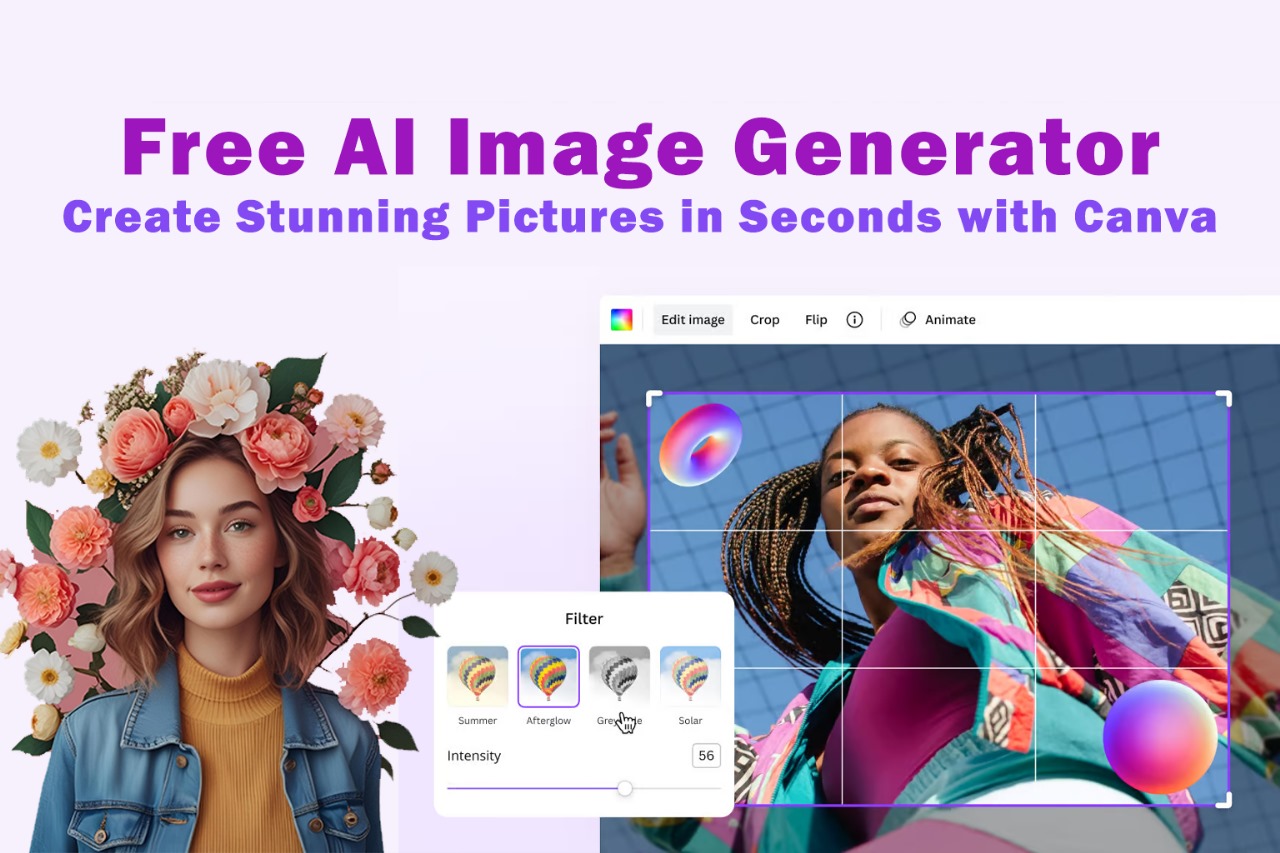
An online tool that uses artificial intelligence to produce images from text prompts is called a free AI image generator. You just need to explain what you want, and the AI will create the image for you, saving you hours of manual design work. The AI will immediately generate original images that correspond to your description, for instance, if you type in “a futuristic city at night with glowing neon lights.”
A free AI image generator is great because it saves time, eliminates the need for complex knowledge, and enables anyone to realize their ideas. Because Canva has built this feature right into its platform, both novice and expert users will find it easy to use.
Why Choose Canva’s Free AI Image Generator?
There are many AI image tools available, but Canva’s version stands out for several reasons:
1. Beginner-Friendly – Canva is known for simplicity. Even if you have never designed anything before, its AI generator is easy to use.
2. Completely Free – Unlike many paid tools, Canva offers its AI image generator for free, making it accessible to everyone.
3. Professional Quality – The images generated are high-resolution and can be used for marketing, social media, websites, or personal projects.
4. All-in-One Platform – Canva not only generates AI images but also allows you to edit, add text, apply filters, and design full projects in one place.
5. Time-Saving – What once took hours of searching for stock photos or designing from scratch now takes just a few seconds.

How to Use Canva’s Free AI Image Generator (Step-by-Step)
Step 1: Sign Up or Log In
Go to Canva.com and create a free account or log in to your existing one.
Step 2: Open the AI Image Generator
In the search bar, type “Text to Image”. This will take you directly to Canva’s free AI image generator tool.
Step 3: Enter Your Prompt
Describe the image you want. Be detailed for better results. Example:
“A cozy coffee shop interior with warm lighting and wooden furniture.”
Step 4: Choose a Style
Canva allows you to pick different styles such as photo-realistic, 3D, painting, or digital art. This ensures the output matches your creative vision.
Step 5: Generate & Customize
Click “Generate,” and within seconds, Canva will create multiple options for you. Select your favorite and then customize it with Canva’s built-in editor. You can add text, filters, or even combine it with templates.
Step 6: Download or Share
Once you’re happy with the final design, download it in high resolution or share it directly on social media.
Tips for Best Results with a Free AI Image Generator
- Be Specific – The more detail you include in your prompt, the better your results.
- Experiment with Styles – Try realistic photos, digital art, or abstract styles to see which fits your project.
- Use Negative Prompts – If you don’t want something included, mention it in your description.
- Combine with Canva Templates – Generate images and then use Canva’s drag-and-drop templates for complete designs like flyers, posters, and social media posts.
Use Cases of Canva’s Free AI Image Generator
This tool is not just for fun – it’s practical for a wide range of needs:
- Content Creators – Make unique thumbnails, Instagram posts, or YouTube banners.
- Students & Teachers – Create presentations and educational visuals quickly.
- Small Businesses – Design professional-looking marketing materials without hiring a designer.
- Writers & Bloggers – Generate illustrations for articles, book covers, or storytelling.
- Personal Use – Create wallpapers, greeting cards, or personalized gifts.
Benefits Compared to Other Tools
Other well-known platforms, such as DALL·E and MidJourney, frequently demand subscriptions or specialized knowledge. Canva’s free AI image generator integrates editing capabilities, accessibility, and ease of use into a single platform. This implies that you can develop an image into a complete design project without switching tools.
AI Image Generation’s Future
AI-generated graphics have a bright future. These tools will become more intelligent as technology develops, yielding even more imaginative and realistic outcomes. Canva is constantly enhancing its AI generator to guarantee that users will always have free access to state-of-the-art design tools
In conclusion
Canva’s free AI image generator is evidence of how artificial intelligence is changing the way we produce content. It allows anyone, regardless of skill level, to produce stunning pictures in seconds. The options are endless, ranging from business marketing to social media posts.
Canva’s AI image generator is the ideal option if you’re searching for a straightforward, effective, and totally free tool to realize your ideas. Discover how simple it is to design like a pro by getting started today!
.

[…] opportunities because they want to be financially independent and have flexible work schedules. Numerous opportunities can be found on the internet, but not all of them are legitimate. Numerous platforms require costly […]
[…] copy is highly compensated by advertisers. ChatGPT can produce compelling ad text for campaigns on Facebook, Google, or LinkedIn when given […]
[…] shaped by artificial intelligence (AI), which is no longer merely a futuristic idea. AI tools are increasing productivity like never before, from businesses optimizing workflows to freelancers managing projects and […]
[…] is now easier than ever thanks to AI, and video content is growing. Using programs like Runway ML, Synthesia, and Pictory, you […]